Is Facer doing a “must be less than 15%” check now like watchface studio does, on WFF faces anyway?
That is a good question - the answer may be the cause of much time wasted and frustration!
I am able to publish with up to 25%. I’m having issues with older non WFF faces and converting them to WFF standards. They tend to fail on publishing, but if I make an exact copy from scratch, it passes with no issues. I think older faces have some sort of residual memory attached to them that is making the WFF conversion fail.
2 Likes
Talking about Faces failing WFF, what about all the “Tags”/“Add Element section” that don’t work anymore? They need to get rid of all of it if it doesn’t work. Also remove the “PRO” features, why pay them money for pro features that don’t work. They’re doing all this crap to “Creator” but can’t remove “ALL” the shit that don’t work. Go figure!!!
They have already removed the UV Index tag, at least it’s not listed on the tags page. ( Facer Tags) I suspect they have not removed most of them just so people can still make non WFF WearOS and Tizen faces. But I also suspect they will be removed when the non WFF users become a small percentage of the total Facer users.
2 Likes
I had a watch face that I edited based on a user’s request and it failed to publish. That left it as a draft, so I assume that meant it wasn’t available even to users who didn’t need a wff compatible face. After several tries, I contacted support who asked me to send them the error message. In order to get a screen shot of the error message I chose to publish again and it sailed through without any problem
I think that’s known as ‘Sod’s Law’ 
Okay, here we go again. Any idea, or does anyone know the problem? I want to put the date number here, but then WFF goes wrong “again”; there shouldn’t be a “0” before the number, or is there another problem? In any case, I don’t see it!
Thanks in advance for any help, ideas, and support.
@lemmensr.be
You have to change the #DdL# to #Dd# which will remove the leading zero and WFF will be happy.
1 Like
try to use (pad(#Dd#,2)) instead of #DdL# if you insist on leading zero
2 Likes
Ok trying it when I m back home  Thanks. !
@petruuccios
Pad is not supported in WFF either. The only way you could get a leading zero on the date is this (floor(#Dd#/10))(#Dd#%10). I have not tested this yet by publishing, but you can bet I will be very soon.
2 Likes
I can confirm those formulas work.
To be on the safe side, I use 4 elements for number of the “01:23” format:
H1: (floor(#Db#/10))
H2: (#Db#%10)
M1: (floor(#Dm#/10))
M2: (#Dm#%10)
For seconds, it’s the same, just use #Ds#
5 Likes
@BIELITZ @petruuccios @tom.vannes @jason.clarke.uk @ed.ludwig @kirium0212
I think I just figured out what is going on or at least in one instance. I updated a face I published a few days ago with the new code for a leading zero on the date. When I republished it I get the warning it had failed WFF conversion. I signed into Facer with my personal account, not my MAG account. I then checked to see if it would show me the face as a different user with a WearOS 6 watch. It showed just fine, so I opened it up in inspection mode still using my personal account. It showed the changes that I had just made so it did get the WFF conversion. It just sent me a false error warning for failing WFF conversion.
I am NOT saying that is what is happening to everyone, just what happened to me one time.
This happens to me to if I use a copy of an old non WFF face.
1 Like
If that is true, then this thing needs urgent update
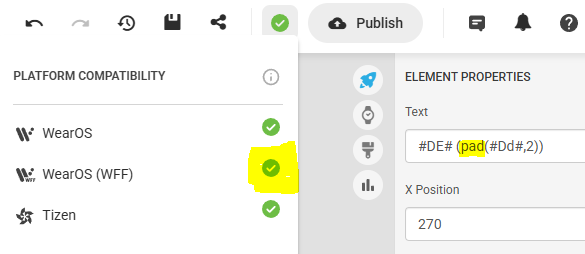

I knew there was such table, just did not remember it also contained “methods”.
Silly me, why would I expect content of that table being translated in the compatibility indicator?
That limitation seems to be on Facers side, WFF alone supports padding (WFS surely does).
AI researched this:
The 3-Digit Battery Code
You can use the %03d format inside a Template element. The 3 tells the system to always show three numbers. The 0 tells it to fill empty spaces with zeros.
xml
<Text expression="[BATTERY_PERCENT]">
    <Template>%03d</Template>
</Text>
1 Like
Codes geprobeerd met " Pad " de hele circus opgeslagen en opnieuw die dag van datum krijg ik er niet op en ik krijg 3x groen dat van apple is rood maar dat heb ik niet nodig… Nog even en deze klok ga vuilbakje in …
@lemmensr.be
Kun je hier in de groep een link plaatsen met de inspectiemodus ingeschakeld? Dan kunnen we even kijken of we iets kunnen vinden dat verhindert dat het bij jou werkt.
Can you post a link here in the group with inspection turned on so we can take a look and see if we can find anything that might prevent it from working for you?