Here is the watch link.
1 Like
So the question, can one test for 12 or 24 setting from the user without using DTIMEFORMAT?
I have asked AI whether I can just use all the various Tags and they said nope. it only a partial solution for for the PM as those numbers are different between 12 and 24.
The DTIMEFORMAT only works in opacity. If you sync test watch and try switching your phone to 12/24 hour format you will see only the AM/PM element visible. The 12h/24h is not visible in WearOS6.
Your watchface is not displaying AM/PM when my watch is 12h mode.
1 Like
Ok I will try that next put Dtimeformat in opacity as on/off and put the condition of which pic to show in rhe x position.
Much thanks.
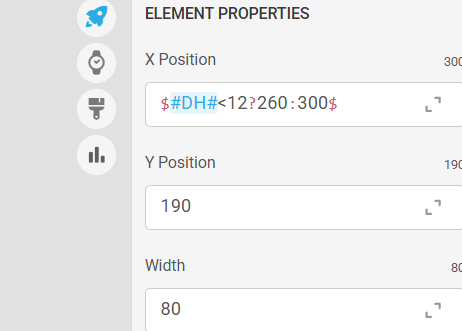
X position: (#DH#<12 ? 119.5:400)
opacity: $#DTIMEFORMAT#==24? 0:95 $
what is strange is that for my M used this same formula and the x position was fixed and it didnt work on your watch. So I have no idea what is causing this problem.
anyways. I did change the () to $ and shifted the Dtimeformat to opacity for A and P so please let me know if it worked.
Much thanks for your time and attention and please resync.
If you haven’t seen my message in the other post, I’ve republished with new formula. hopefully it cured the problem.
I had (#DH#<12 ? 120:400) and changed to $#DH#<12?120:400$ I think the spaces and () may have been the problem. Both worked in creator but when publishing something messes up. I have used spaces in other watches but this one perhaps is just not going to work with spaces.
1 Like
Yeah . Using () is good if you are testing a formula in a Text Layer . If it works without and you have your Precedence right you dont need () . He He . Some can some can’t . I was always told to avoid spaces . Glitches can creep in any Gap . I am so glad Creator seems to be setteling down . Is everone seeing the small Expresions Syntax .
.
1 Like
Hi Rator, a question about charting. How many downloads (minimum) does it take before one of your watches gets on the charts?
it depends on the flow of competition. if the rest of the partners are putting out good stuff at the same time you are, then sometimes it takes over a hundred to even make the bottom of the chart.
1 Like
Yes, for WearOS about 100 syncs, but I think the likes are also taken into account in the beginning. I have one face at position 74, published 12 days ago, at 152 syncs. But I also have one which now has 102 syncs after 1 month that never made it into the charts.
I believe it helps to publish at the right moment. In Europe, publishing in the morning is not a good idea. After 5 in the afternoon is better, that’s when people are off work or the kids are out of school. That’s my expierence …
For Apple watch faces it takes less, about 25.
I have one on position 63 which only has 38 syncs.
1 Like
So the next question, what does being on the charts do? Do people tend to download more likely if they see something on a chart? I.e. do you see a boost once it hits the chart?
And why would time of day matter? If too early in the morning, does it mean it rolls up some list and harder to see?
I would guess there are people that follow you. They would get notice no matter what timing.
I guess there is just of noise one has to compete against not just unfortunate timing of good releases coming at the same time.
Being on the charts puts more eyes on your watchface than would have seen it just by normal searching.
Getting on the charts is nearly impossible unless you spit out tons of faces. I see mostly huge numbers mediocre watch faces on the charts, and creators with less than 100 premium quality faces never get noticed. Especially if they’re ABB imports.
This is just a little comparison between Facer and WatchMaker with the same exact watch face. I wish Facer was more fair with their algorythms.
WatchMaker (7 followers)
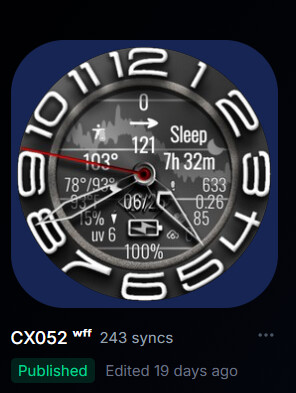
Facer(124 Followers)
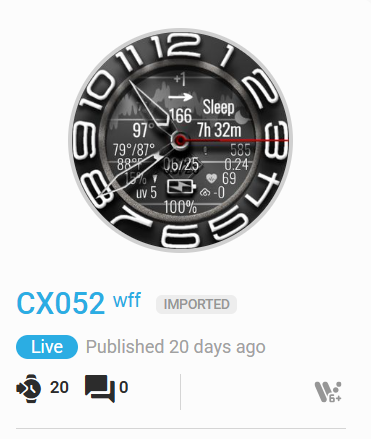
1 Like
Well, I got 35 syncs for my Vader Time and I have 12 watches published. It’s the most I have every received. It’s not going to chart but still a worth feeling good about it.
3 Likes
pretty sure the number of faces you release doesnt have any bearing on getting in the charts.
1 Like
Consider this, if you are “spitting” out tons of faces, you’re more likely to be seen. Right now I have two in the top 100 WFF chart, but I’ve been here since 2019. I was never in the charts at all until I got picked for one of the Facer sections. I believe it was the “Big and Bold” section. After that I started increasing in followers and with more eyes seeing my faces, soon hit the top 100. As of this morning I’ve had 418 watchfaces in the Top 100 WearOS & WFF pages and 44 in the Apple Top 100. I’ve since quit doing any Apple watchfaces just because they are a pain to do.
1 Like
What platform do you use to create Apple Watches faces that run natively on Apple? From all my research, apples does not allow 3rd party developers to create native watches that stay visible on the watch and not disappear like an app and overwritten by the apple clock face?
1 Like
I’ve had 7 faces in the top 100 on WatchMaker in a few weeks. Been on Facer for almost two years, and never got close.
Facer in two years:
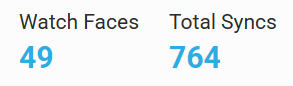
WatchMaker in two months:

Facer (the company, not the folks here) mostly makes me feel unwelcome. On top of that, I’m fighting with support yet again, and can’t get them to reply. It’s insane!!! They made some promises, with a timeline attached, and two weeks later they didn’t do what they said they were going to do, and won’t reply to me.
Number 1 Rule in business…“DO WHAT YOU SAY YOU’RE GOING TO DO”.
1 Like
@ed.ludwig I can’t disagree with anything you just said. I’ve found that to be true at times myself.
1 Like
well there are different audiences for both companies so you cant really compare the two as far as watches charting over there vs here. its seems to be random if a face does well, did it hit the people it was meant for at the time they would see it? was it launched in the middle of the night in the UK? might not do as well as if you did the same in the US, but who knows.
1 Like