I have been away from Facer for about 8 months and have read about issues with the platform. On my first day back, it is doing some weird things. Not sure if it was always there but I don’t remember it happening before.
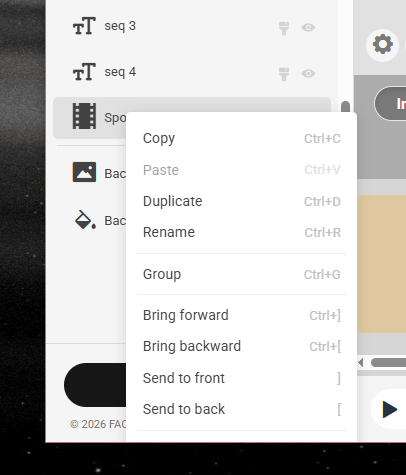
For example, clicking on an element to rename but it disappears? I was able to exit unsave and try again and it worked. But it has happened a few time.
Physically click on the name disappears the element. Not right clicking and selecting delete. Or it almost appears to re-order the elements around it.
Yeah . Creator is a bit Buggy right now . What you have going on sounds like a bug in the Grouping utility . I am not using creator much at the moment .
@ghsu.ca
That works except on the very bottom element when there are several. It always wants to show up below where you can’t click it. On those I just select it by tapping on it and then hit the delete button on my keyboard.
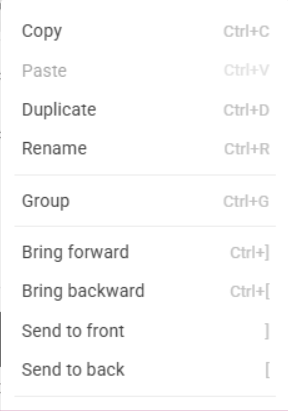
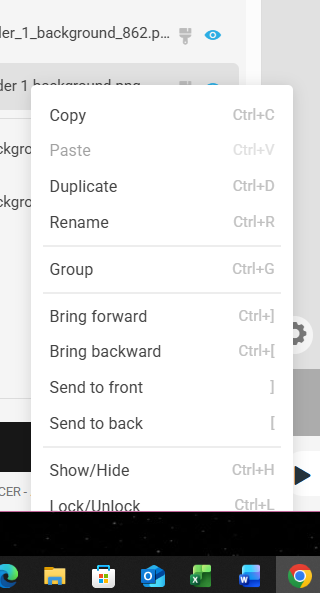
Figure out which hot key (keyboard shortcut) it is and use that. It’s right in the menu (well, if the menu is fully visible). I’m a keyboard guy to begin with, so I’m always looking for the hot keys.
Not sure why you cannot use the below in the opacity for an image. I use it all the time (though in a text element for the #Da# tag.
$#DTIMEFORMAT#==12?100:0$
or
$#DTIMEFORMAT#==24?100:0$
I went around it for by just using Db and that worked.
But I need to use it for an AM and PM images and I can’t get that working without using the DTIMEFORMAT as there are no other 12 or 24 hour tags to tell me which is operating.
I think it is related to “displaying a picture” versus just a number.
I am now trying to split up the formula. DTIMEFORMAT for position. and then test the DH for am pm for opacity. See if that works. My guess the DTIMEFORMAT is blocking the pictures some how.
My AI (Claude) said this
That nested ternary is the problem — WFF export only handles flat, single-condition formulas. The fix is two copies of the same digit layer, one per time format, since the conditions are mutually exclusive only one is ever visible:
Layer 1 — 24h mode:
$#DTIMEFORMAT#==24&&#DkZB#=5?100:0$
Layer 2 — 12h mode:
$#DTIMEFORMAT#!=24&&#DhZB#=5?100:0$
Both use 2 boolean/comparison joins, well under your 3-operator limit, with no nesting.
One thing worth noting: your inner guard (#DkZA#=2&&#DkZB#=4 → treat hour “24” as 0) is irrelevant for the digit-5 layer — if the units digit is 4, it can never equal 5, so I dropped it. It only matters on two of your ten digit layers:
Digit 4 (24h) — must hide when hour reads 24:
$#DTIMEFORMAT#==24&&#DkZB#=4&&#DkZA#!=2?100:0$
Digit 0 (24h) — needs a third extra layer to show during hour 24:
$#DTIMEFORMAT#==24&&#DkZA#=2&&#DkZB#=4?100:0$
stacked alongside the normal $#DTIMEFORMAT#==24&&#DkZB#=0?100:0$ layer.
Every other digit (1, 2, 3, 5–9) just gets the plain two-layer split. Want me to write out the full set for all ten digits?
sorry should have been clear. the digits are fine and I don’t use the DtimeFormat. Just Db.
It is the AM and PM. If I just use Dtimeformat with just testing for 12 vs 24 and display pictures, it just fails.
BTW, have you downloaded the image? does it show the AM / PM for you? That is my problem it doesn’t show up at all.
The digits are working fine without DTImeformat.
My problem is that if DTImeformat does not work with pictures, and there is no other Tag in facer that tells me whether it is 12 or 24, not sure what I can do.
But I’ve only had one person say that they don’t get the AM/PM.
It could be a local watch problem but can’t tell without someone else saying they don’t see the am pm at all.