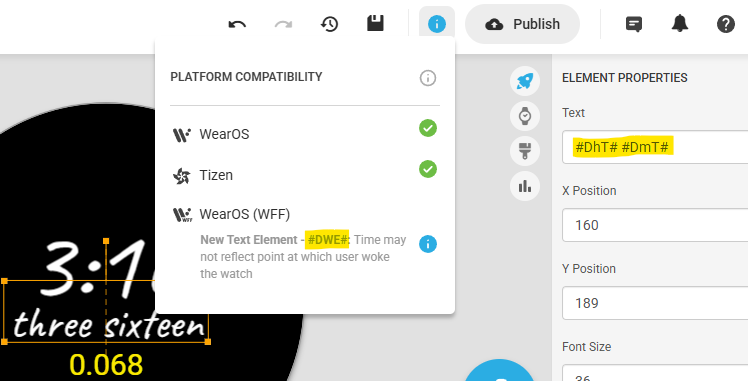
I can’t figure out why this face won’t publish. Publishing failed for some platforms: WearOS (WFF). Not getting any errors in the editor whatsoever.
1 Like
Last two I tried to publish would not go with WFF even with green check and nothing that would cause it to fail. I think it must be on Facer’s end again - hopefully they fix it.
The expression in the Seconds element is quite complex.
Could be the reason…
3 Likes
As what Tom said… you need to create 60 separate layers for each IF condition,
so your opacity will be $(#Ds#)==1?100:0$ and your TEXT will be ONE.
1 Like
This is what i did -
With help (lots of it) from @petruuccios
Im not sure it will publsh as wfs but no doubt it could be split
It for sure could be split into less than 60 texts (35 maybe), but to make them aligned same way as when there is automatical string would be more tedious than making the whole set of 60 layers.
oftopic, but noticed it when tried the options. Seems the font selection changed somehow:
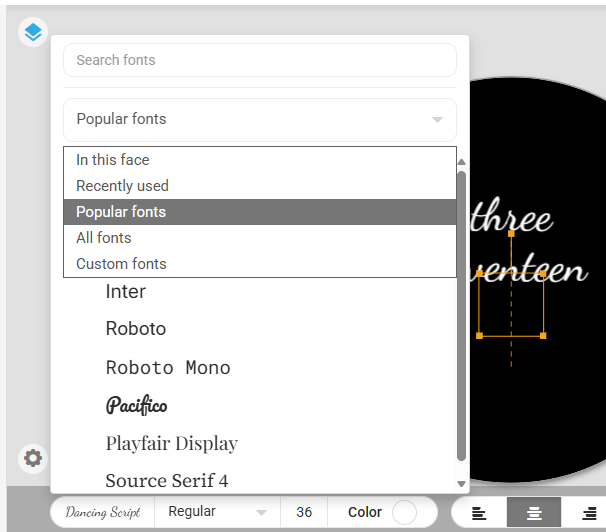
1 Like
Didn’t change for me on PC
maybe on beta
Still not going for wff
Delete the seconds elements (copy the fomulascin notepad or duplicate watchface 1st) then try publish to see if that layer is issue
1 Like
nope, that’s not the issue. GRRRRR!
The name of 2nd element starts with “!”. Try renaming that with no special characters. Otherwise you will have to delete element by element and publish to find the one.
Duplicate…then delete 10 elements try publish…keep deleting 10 at a time…when it publishes you know the block of 10 to review. Use version history to restore previous version.
I have used !Shadow9.png on multiple faces before with no issues
Gonna have to delete elements bit by bit then to try and identify the cutprit
Well, I found it, it’s all the TEXT TIME that doesn’t work for WFF. I removed it and now all 3 formats are lit up in creator. This sucks, spent a week on this face and it won’t work for the WFF format.
Ahh it would be nice if the error contained the expression at fault. So if watch face studio does not have dedicated tags for this you would have to create your own layers…or just not share this on WFF.
I dont know if its the same for everyone but in creator pressing the blue i this takes/shows me the tag that is causing the problem
Creator is showing any problems with the face though
Yes, that definately helps… should have checked that first!! must be the mini heatwave we are having in the UK!
But if it is showing all green ticks… maybe time to log a ticket with help.facer.io and report the issue formally.
Problem is the compatibility check is not accurate or reliable.
if the tags for time as text strings are causing problem, why are they not mentioned as no no on the creator reference, nor in the check