For those of you who are wondering when your Samsung watch will be usable on Facer with the WFF only restriction. One UI 8 Update for Galaxy Watch 7, 6, 5, 4 – Release Date & Rollout by ALLSTARSPACE Just for the record I have my Watch 6 Classic and my Watch 5 Pro both set to not automatically update. I’m not real impressed with the performance on my Watch 7 Ultra.
4 Likes
Is he misspeaking when he calls OneUI 8 a beta? It’s definitely not a beta version on my Ultra, but maybe there were enough issues that they are now calling it a beta? That said, NO ONE gets beta releases without signing up, and he said it just showed up on his Watch 7. So there’s plenty that doesn’t make sense in this video. Honestly, based on your wording, I didn’t expect this to be a video, I expected it to be an official statement from Samsung with the release dates.
I do look forward to getting WearOS 6 on my 6 Classic. I see no reason to no update.
2 Likes
It’s a beta version for the non-ultra watch 7 watches. The Ultra version is the release version.
2 Likes
In my 40 years of IT, I have never seen this. A release out before a pre-release…
I’ve seen pull backs up patches that went poorly, but never this.
2 Likes
Considering that each watch has its own individual software and then throw in the fact that there are Bluetooth and LTE versions which also has different software requirements. In the video he did say that Samsung was doing things differently this time also. Last time for WOS 5, they pretty much did each group of watches as a whole releasing all the series 6, then 5 and finally 4 within days of each other.
1 Like
Thanks for that MAG . So for me GW7 , he reckons September , not far away . Also not Beta for the 7 . I have switched auto update off for my GW5Pro . I heard it said that Updates can force themselves on a Watch . My guess is if the WiFi is off as well that would not be possible .
1 Like
I just want to keep my 6 & 5 so I can use all the faces from Facer, not just the WFF ones. I’m not that thrilled with Facer’s adaptation of WFF compatibility yet.
4 Likes


WearOS is a Bare Metal, it shouldn’t matter what hardware its going on. It’s it’s more about OneUI 8 being layered on top of it. I would guess that’s where the beta comes into play.
I have no concern over being able to use legacy Facer faces. I started with WFS and will continue with WFS.
I don’t think there’s anything wrong with how Facer is handling this transition. I just think it was a bigger undertaking than they anticipated. Plus, they’re hands are pretty much tied when it comes to legacy stuff just working. Most items will need to be ported in some way, and that will take time.
2 Likes
Let’s not forget that we are still dealing with a beta.
4 Likes
I updated to the official stable release of One UI8 on my Galaxy Watch 6 Classic yesterday, and most of my favourite watch faces are now “not available”. Even the two remaining (out of 17) that did load will not show location and phone battery status. I tried uninstalling phone app and watch app, resetting, etc. still nothing. Shame.
1 Like
Yes @darin.rodgers . We have been talking about these things for GW 8 for some time . Some of us are trying to avoid the update on our Legacy Watches . Sadly there is no going back that we Know . When People start Posting more Faces made on WFS you will see there are Compensations . I have published one that can show Phone Battery . But you need to run an App from the Store . I have not come across Weather Station Location . I would rely on your Phone with a Data connection for you Location stuff . The watch one was never very accurate any which way . I think the saddest thing is we can only have one facer face but we know why that is .
Talking about Beta . I remember the days when You were invited / applied to Beta test stuff prior to Release to the Public . I remember the days when Android was Open Source . I will admit in those days It worked like a Sack Full of Frogs .
.

2 Likes
I can relate.
1 Like
It’s not so easy, but it is doable…
to convert/remake your Facer face to OneUI 8 using Samsung’s Watch Face Studio (WFS).
I admit my Facer face is rather simple:

but it does exactly what I wanted and really does improve batter life.
Here is what it looks like remade in WFS:
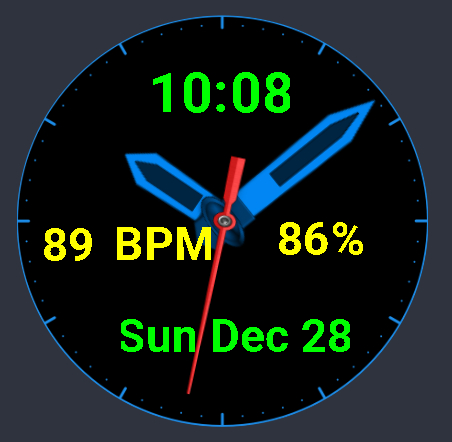
It’s not quite the same - but it’s close enough for me. I haven’t figured out how to activate the weather data, but I seldom used this anyway so I may not do it. Also, I don’t like the Index graphic nearly as well, but I haven’t been able to find a place that has options for those.
Overall WFS is quite similar to Facer Editor, but it has fewer options for hands and indexes. I had trouble figuring out how to make hands move properly, but this link has the info needed to do this:
The WFS procedure for sending a face design to the watch works well, but is quite tedious and, at least for me, highly annoying. The best way to find out how to do this is to do a Google search for “how to send watch face from Samsung watch face studio to watch.”
I know - but that’s how I got the process to work. Here’s hoping the Facer people will find a way to get Facer editor the ability to comply with OneUI 8 fairly soon. I’d really like to get my old face back on my watch.