Ok, this is really weird.
I went to Rusty-Cress and found the watch faces … from there I was able to add them absolutely no issues whatsoever.
But from anywhere else? nada.
Go figure.
But the really weird part? The face from #02 and #04 were different pictures when downloaded on the watchface. Number #02 has 6 pictures (when I look into it) and #04 has one.
Did not expect that.
1 Like
Yeah I am so sorry It is a Pet Beef of mine about People who plonk a Picture on a Face and publish it . So at least we should have a little slide show .
So @alwaysbusy4family can you please tell me how often the Picture changes . I think it is 6 seconds .
I can not tell you what a privilege it is to have a User give Feedback . To use a word you use we get NADA .
It is quite possible you could do it yourself but as a test for us here on the community.
If you would like to send me some pictures or tell me what sort of Images you would like to have on your watch . I would love to work with you to see what we can squeeze onto a Face . I think I have read somewhere that it can be 24 . But the resolution might be up for grabs .
I thank you so much . As a Publisher of Free Faces you can imagine that any Feedback is the Life’s Blood of the Craft.
Sure, as far as how fast the slideshow changes - every time I lower my wrist and raise it again. With a beat of about 1 and 2. It changes pretty quick.
As far as watch faces… I have found I have a limit of 50 on my watch… ooops. Will be happy to delete a few so I can test. Sounds like fun. Hopefully I can give you decent feedback.
Ok… as far as testing the amount of pictures for a single watchface - limit is 24.
At least on my apple 7.
1 Like
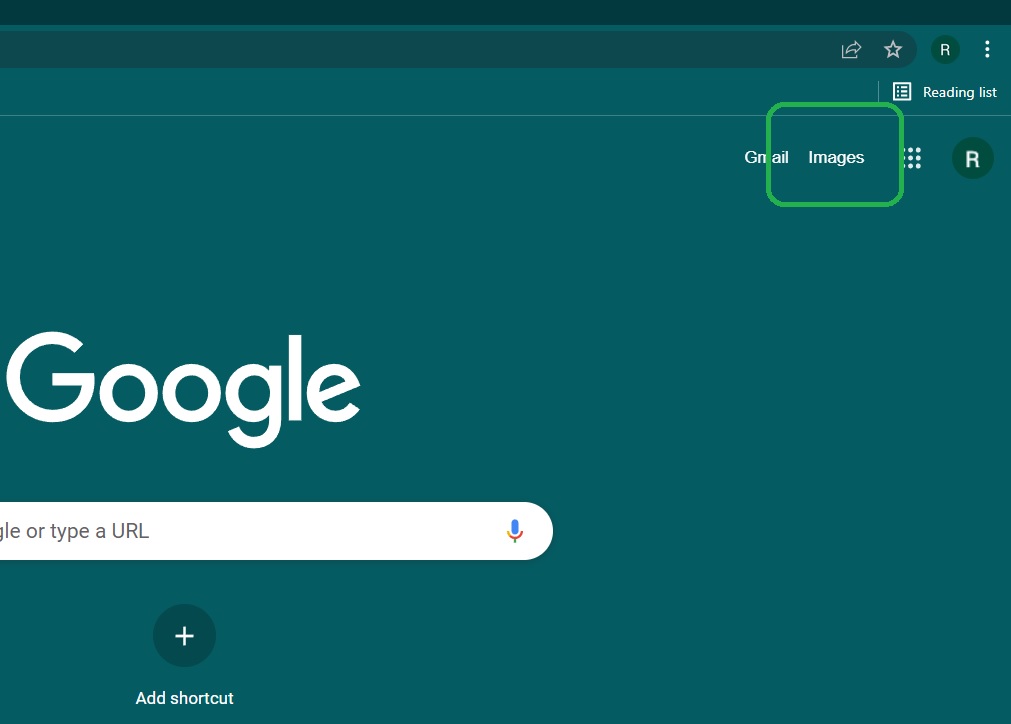
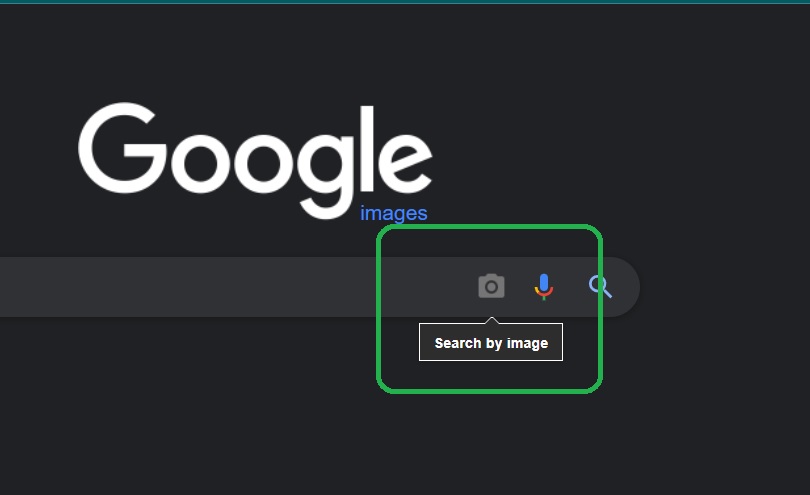
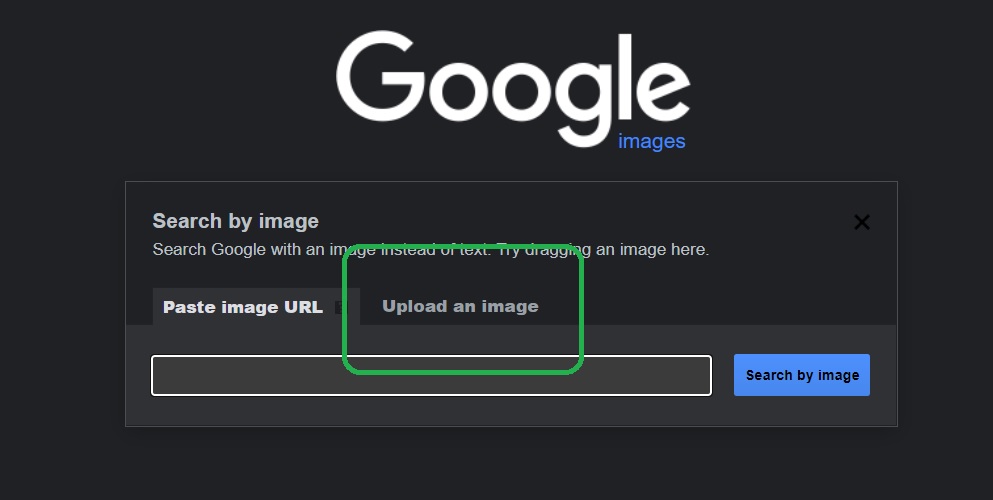
My Friend @icrltd4 . I actually used Google Images on it . I copied and pasted a pic of the watch . Google then found the artist . Never used it before.
1 Like
I must Call you Jo if I may . I have been using your profile name to be Clear but it is a bit official . Interesting you have taken your watch to its limits already . I am only interested in posting one . Since you have seen my Apple Designs I am only really interested in doing original stuff . Or as Original as I can be . But I would like to make a proper slide show Face . I would expect somewhere on your watch that there is a setting for the speed the pictures change . I think every one or two seconds is a bit ridiculous . Of course only if you are Interested . Please let me know what kind of imagery you are interested in . I will happily make you a family Album but naturally that would not be Private. 

Thanks Rusty mate 
@alwaysbusy4family Here’s my exact same Face created purely to see if you can sync it without any problems. It’s quite simply just the Face with a Photo and the Day, Date, and Time already pre-defined by Apple -
1 Like
I tried to grab that one, no luck.
So I went to your page (Gizmo411) and tried to sync a few others. No luck there either. I am not sure why.
I tried favoriting Playful Grogu for Apple - and then tried to sync… nothing.
1 Like
Sorry, I wasn’t clear before.
As far as how fast/slow faces would change on the watch. They change pretty much every time you lift your wrist. If you have it up, it does not change at all.
So the slideshow is basically changing when you lift your wrist to look at it, but it doesn’t change when you are doing an app or otherwise looking at your watchface.
2 Likes
Hi Jo. Cool. The impression we get is that it is on a timer. With other wake on Gesture Stuff we simulate it on the Preview by tapping on the dim Icon. I will give that a go. Thanks again for sticking with this. I can assure you it will be appreciated by many. You may see Your Topic has had 80 views already. Admitadly a lot of them are us but others will see this and the Title of the Topic is usefull in a search.
1 Like
LOL I haven’t beta tested in a while, this reminds me of that.
Happy to help. I appreciate the help ya’ll gave me! Love the watchface that works! 
(Normally I go for a lot more complications on my watchfaces, but days when I have migraines, I go for a simple pic - brain can’t handle more than that  )
)
2 Likes
Sorry to hear you suffer with migraine. Sorry we can not have relaxing animations on the Apple Watches.
1 Like
That’s well weird you can’t sync any of my Faces  You’re using a legit, properly downloaded version of the Facer App on your Phone to sync yes?
1 Like
I am. Even paying for premium membership. Also have a recently reset apple 7.
It could be me.
I did try using different browsers on my computer. Gonna try from phone. Have iPhone 12 pro max.
Ok- works fine from phone, no problems at all.
So now I know most of my issues are probably the browsers and the no ad addons.
Next step will be disabling those.
2 Likes
That’s cool, still very strange you can’t sync a lot of Faces though. I just Published 3 more using different artwork form the same artist we used first lol
1 Like
Let me reset my browsers and I can try again from the computer.
Phone works great 
2 Likes
Thanks for the empathy. I find workarounds to keep things going. I just do less. 
2 Likes
Jo . Remember you watch is connected to your Phone via Bluetooth . Although You could be asking for a Sync on another device it is your Connected Phone that sends it to the watch . Pleas do not keep resetting things . That is a lot of work . A reboot is often Helpful but I think there is something else going on . It would be really good if an Apple & owner chipped in here . But we will get it sorted.
You need to switch on a lot of permissions for Facer and Apple to work together. I am not sure where you find them but when you do switch them all on . Ask your Phone Not to Manage Power to Facer Automatically .
Oh! No, I only reset it that one time. I do not keep resetting because that is a pain - and frankly, if it doesn’t fix it once, it ain’t gonna.
I found out some of the issues, still working on a couple.
If I am on Facer on my phone… no problems. I can get, favorite and sync without any issues.
My problems are when I am trying to do this off my computer. THEN I have problems galore! I thought it was the browser, so I switched a couple times (I have a few). Then I thought it might be the adblockers messing with the sync… AND… I am still working on trying to make this work.
My computer is running Microsoft Windows 11. Updated. Decent hardware, but not gaming quality.
I had it on a couple of times where it would work from the computer to my phone… and obviously to the watch.
The break is getting it to work from the computer to the phone.
I took my adblockers off Microsoft Edge (cause that is the easiest and I hardly ever use it) - no soap.
I have Brave and Firefox, but if I have to install Chrome I can. (Chrome just isn’t great for privacy)
So now I hope you have a better picture of what I am working with. Not to worry, I am not resetting my watch over and over. Once was enough (and that was to fix a bug when something wasn’t working.)
2 Likes
Looks like you’re sorting it all out for yourself there, well done 
1 Like