BWT #2: looks better with uniform sized numerals. Not sure why I ever bothered with varying size.
I do not master Excel… so use what I know… 
Yes, nice idea.
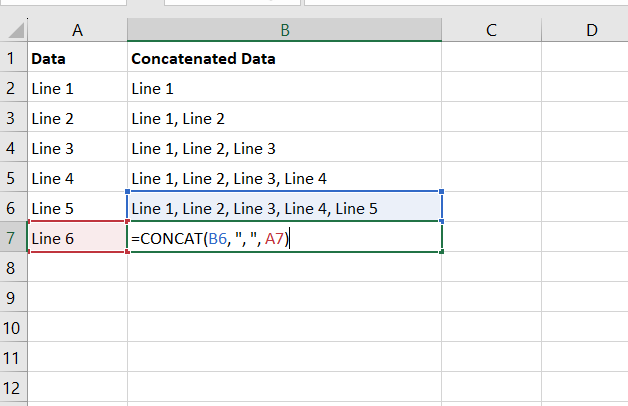
This is how I do it: B2 is just the same as A2, then starting with B3 and going down I concatenate what’s in the cell above with what’s in the cell to the left.
Fantastic! Thanks! I learn something everyday!
1 Like
Is this because Facer Creator doesn’t filter on the carriage returns in the formula field? Maybe a browser limitation? I’m also not an Excel expert, but I can parse the crap out of a text file with a script like no body’s business.
Liked it so much I made an inferior copy, two in fact. The hour/minute ring was simpler than I expected it to be from my first glance. The shiny bits had me mesmerized I suspect.
Started in Creator but ran into that same “can’t open a draft” issue. Finished in WFS.
Have you tried opening the draft in Edge Private mode or Chrome Incognito. If that works, then delete all your browser cache and cookies for Facer.io
Used to work when I switched from Firefox to Opera or Chrome, given I usually use Firefox. That trick doesn’t work anymore.
I had to try it to find out: Facer seems to strip out carriage returns in a formula field, but regardless, it doesn’t seem to be a good idea or even practical to have carriage returns in a formula.
To answer your question, those Excel lines are just to piece together multiple parts of a single formula, for example multiple conditionals. A good example is the Roman numerals face I mentioned earlier: I used formulas in Excel to convert numbers 1 to 59 into Roman numerals, then built the conditional formula to use the Roman numerals one by one, and then I used Excel’s CONCAT (just like the screenshot above) to string it all together into a single (and long!) formula. See here:
2 Likes
I disagree, I’m a Martin Fowler type of computer programmer.
This has been my email signature for 20+ years.
“Any fool can write code that a computer can understand. Good programmers write code that humans can understand.”
Martin Fowler
This is how I want to see my formulas:
(([WTHR_COND] == 0) ? “0” :
([WTHR_COND] == 1) * ((forecastHours(2, “IS_DAY”)) == 0) ? “1n” :
([WTHR_COND] == 1) * ((forecastHours(2, “IS_DAY”)) == 1) ? “1d” :
([WTHR_COND] == 2) ? “2” :
([WTHR_COND] == 3) ? “3” :
([WTHR_COND] == 4) ? “4” :
([WTHR_COND] == 5) ? “5” :
([WTHR_COND] == 6) ? “6” :
([WTHR_COND] == 7) ? “7” :
([WTHR_COND] == 8) ? “8” :
([WTHR_COND] == 9) ? “9” :
([WTHR_COND] == 10) ? “10” :
([WTHR_COND] == 11) * ((forecastHours(2, “IS_DAY”)) == 0) ? “11n” :
([WTHR_COND] == 11) * ((forecastHours(2, “IS_DAY”)) == 1) ? “11d” :
([WTHR_COND] == 12) ? “12” :
([WTHR_COND] == 13) ? “13” :
([WTHR_COND] == 14) * ((forecastHours(2, “IS_DAY”)) == 0) ? “14n” :
([WTHR_COND] == 14) * ((forecastHours(2, “IS_DAY”)) == 1) ? “14d” :
([WTHR_COND] == 15) ? “15” : “”)
Easy to read, and easy to modify. Samsung Watch Face Studio 100% accepts these formulas, because they know it’s the right way.
I’ll rephrase that: it doesn’t seem to be a good idea or even practical to have carriage returns in a Facer formula, in the way we are limited to a single-line text box where you can’t even see the full width of your formula.
Otherwise, since my first programming days in the late-80’s I absolutely prefer code to be physically structured not only with line breaks, but also with indentations, so that a good old if-then-else-endif would be easy to read when properly structured/indented.
2 Likes
More changes since I’ve been away!
1 Like
Seeing changes gradually isn’t so bad but discovering them all at once can be overwhelming! 

3 Likes
Ab–so–lute–ly!
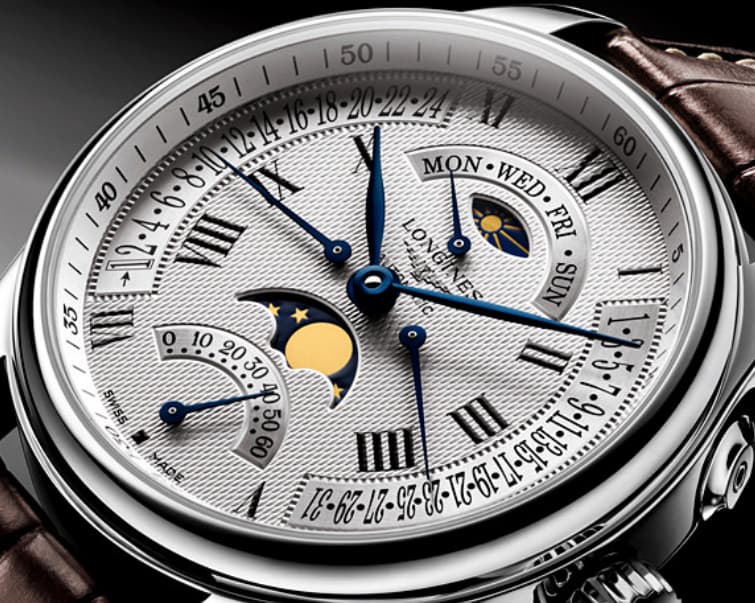
Who thinks that whimsical face should use jump hours, as opposed to letting the hour hand show incremental hours? It seems to me that either way has its own points of confusion. Someone who is fully aware of jump hour watches should be comfortable with it, but others might go 
The original Franck Muller watch is a jump hour.
And BTW, I ended up matching the font size of the numerals, looks better than the first version.
1 Like
I think in that case the hand should step hour by hour . I always thought a jump hand was one that flew back to the beginning of an arc Dial at Zero . But at the end of the day we all know what you mean . I think the journey of the hand between the hour markers would be quite wrong for me .
2 Likes
Then I’ll keep it jumping, as much as it can cause confusion, especially at a few minutes to the next hour-- 10:58 looks awfully close to 10:00! But there be confusion either way.
A hand sweeping an arc and snapping back I think is retrograde?
1 Like
Yes @kourosh . You are right . I like the description of a Jump Seconds Hand as Dead Beat . Not sure if that is correct .
.
Oh Go ON .
.
1 Like