What is it? I can not run, nor download it.
1 Like
Hey pinball, yes, I will make it free for everyone
3 Likes
Tudza, thank you for sharing the resource, it looks great. The purpose of my tool is to complement the workflow for creating markers, dials, subdials, etc.
1 Like
Did everything on this face with it
2 Likes
Another example. Pretty much every face in last year at this point.
So far as I can tell the software I’m using hasn’t been worked on it a while. Couldn’t hurt to have a different flavor in current development.
2 Likes
Hey people, new update here
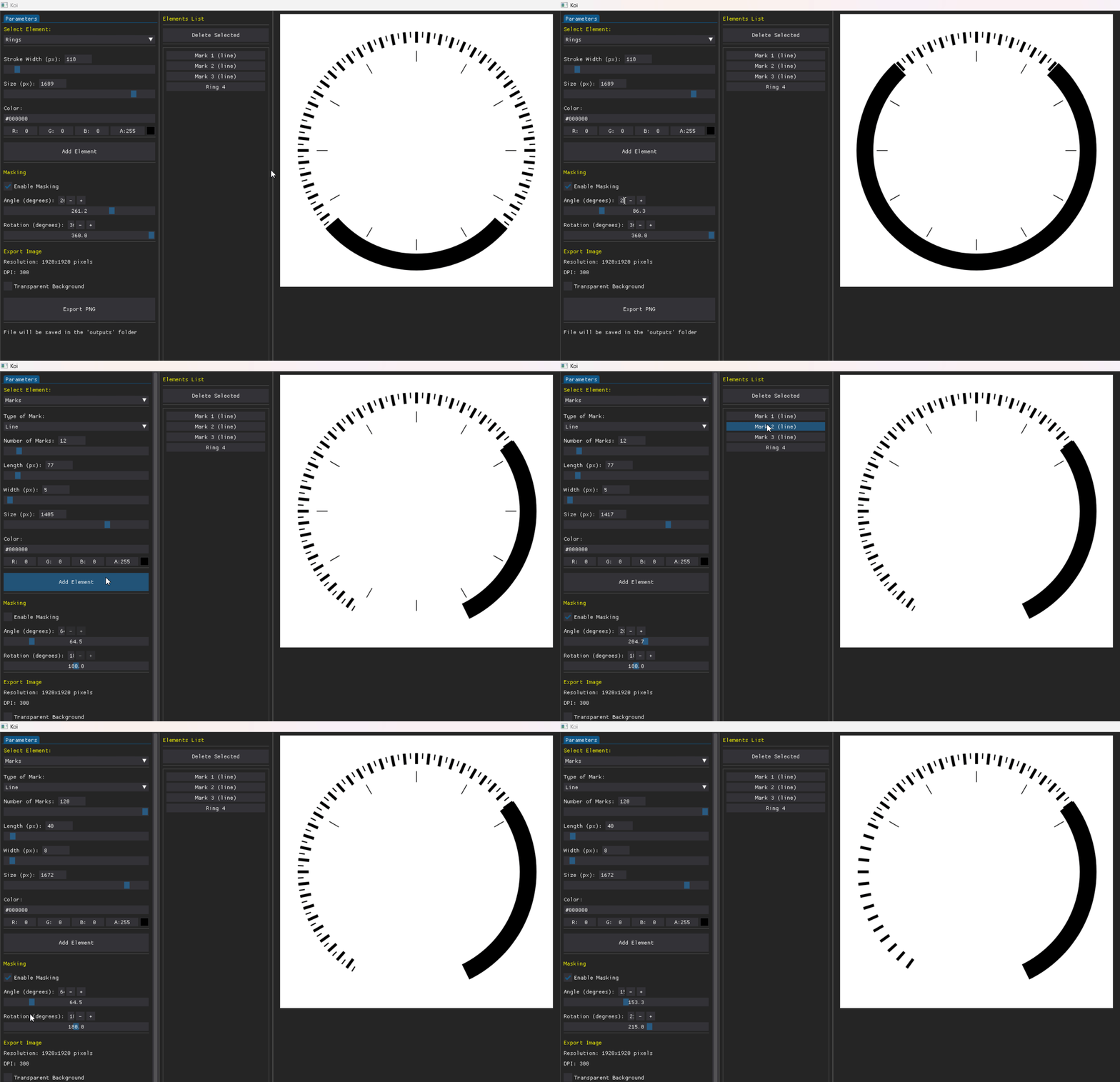
Today I wanna share the advance with layering and masking, I think this will be useful for create dials, and subdials.
The mask can be setup for “hide” items using an angle of cover and rotate the mask.
The layer system allows you to have independent elements and modify their properties at any time.
6 Likes
where is this program at?
Yes, I’d like to give this a try too. But where is it?
i applaud for your generosity and knowledge to make available interesting accessible tools for creation like the marks and elements.
I am probably the exception here, but i like the challenge of creating these objects and many others, myself, enlarging the customisation, learning, applying some dynamic features like lightning and thus shadowing, displacement and animating etc. of all these objects, which add character and beauty. And so i made my hours in Blender, with up and downs, i went on to add a new layer to face making, graphic design and i love that even more than face making. Of course there are many software, aiming too achieve all that.
2 Likes
Hi, it’s still in development, I’ll make it public once it’s finished.
5 Likes
Thanks dude, I love Blender too, your work is great.
2 Likes
Thanks buddy. I checked your page. Beautiful stuff. Great compositions, color schemes. Beauty and functionality combined. BC.
1 Like
Hello,
did you have any luck with progress meanwhile?
2 Likes
Hi @koidevstudio
I’m keen to see your great work published for all of us.
Great idea and great job
1 Like
There’s starting to be a queue for your tickmarks app. The anticipation is great and I can see many here can hardly wait!
I’m sure that it will be useful for many so please could you give us an update?
1 Like
Hey buddy thanks!
Hi guys, sorry for being gone for so long, I’ve been a little busy.
@petruuccios @BIELITZ I hope you are doing well!
Here is an update of the project:
IMPLEMENTED FEATURES SUMMARY
- Rendering modes
- Marks (ticks) – Marks around a circle with two styles: Line (radial segments) and Circle (dots).
- Rings – Filled concentric rings with configurable outer radius and ring thickness.
- Typography – Text laid out along a circle with adjustable font, size, rotation, and letter spacing.
- Multi-element composition
- Layered elements – Add several elements (Marks, Rings, Typography) that stack in order (first at bottom, last on top).
- Element list – View and manage all elements; select one to edit its parameters.
- Delete selected – Remove the currently selected element from the composition.
- Per-element controls
- Marks: number of marks, length, width, size (radius), mark type (Line / Circle), color.
- Rings: size (radius), ring thickness (length), color.
- Typography: text, font family, font variant (Regular / Bold / Italic / Bold Italic), font size, letter spacing, rotation, flip 180°, color.
- Per-element masking
- Enable masking – Toggle masking per element.
- Angle – Opening angle of the masked sector (0–360°).
- Rotation – Orientation of the sector (0–360°).
- Mask is a sector from the center; masked area is transparent (or white when background is not transparent).
- Each element has its own mask; masks do not affect other elements.
- Export
- Transparent background – Option to export with or without transparency.
- Outputs folder – Files saved under an outputs/ directory with descriptive filenames based on the element propeties.
- UI & Preview
- Simple interface – Real-time preview and controls (sliders, inputs, color picker).
- Live preview – Updates as parameters or selections change.
- Font selection – Choose from system fonts and project fonts (e.g., Roboto); search/filter supported.
- High-quality vector rendering engine.
- Layered compositing – Each element (including masked ones) is rendered to a transparent layer and composited, so stacking and transparency behave correctly.
The project is currently designed as a desktop app but I am exploring the feasibility of converting it into a web solution to make it more accessible to everyone.
Again, my apologies for the absence, and we will have more updates soon. Thank you very much for your interest!
3 Likes
Can’t wait for it to be available to download. Thanks for doing this!!
1 Like
I too, cannot wait! This is going to be something awesome!
1 Like
That is impressive list of features.
Maybe you could add a toggle to circle elements to enable just section like arc.
Or maybe that would be solved with mentioned masking?
1 Like