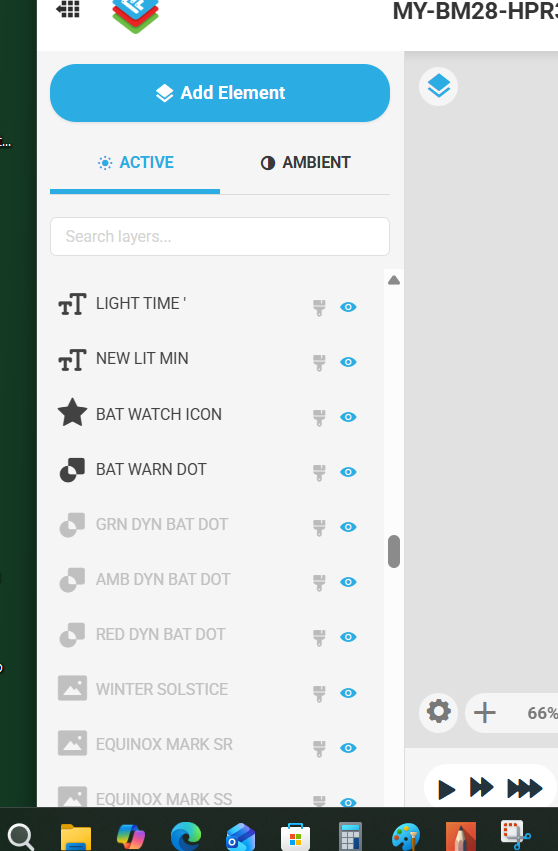
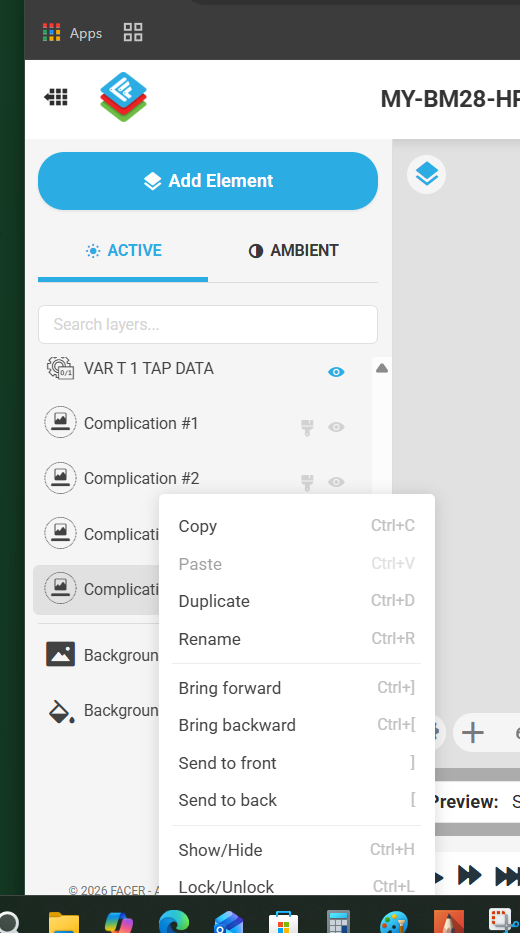
I just noticed a change to the creator this morning. The visible Lock/Unlock icon is now moved to the Right-click options menu.
I primarily create watch faces on Samsung Tab Ultra tablet, and getting to this lock/unlock feature is now much harder. On tablet, I have to press and hold the field for 1-2 seconds. I cannot Multi select items from the elements menu that are locked. It was much easier to have the lock icon visible in the elements sections.
Please comment if you use TABLETS to design your watch face, so that Facer Support are aware their users are using this platform to design watch faces. How are you getting on with the new Right-click menu options on Tablet?
Just in case I am doing something wrong here - is there any way to multi-select LOCKED elements on Tablet?
It would be nice if the Lock/Unlock visibility could be made a configurable option to make it visible, so that Tablet users can turn it back on.
I have also noticed that you can only easily select unlocked elements (on desktop/laptop). Once you lock them… you can only unlock them one at a time by right-click
2 Likes
Thanks for the message. Haven’t used Creator today.
Not that I have your issue, but I would have searched for the menu…
Not ideal in my eyes - means more than one step to lock/unlock!
1 Like
I kept thinking the page hadn’t loaded properly, tried different browsers… & then sussed it.
I feel your pain if you’re using a tablet. It’s sooo much nicer on a desktop. We’ve now got keyboard shortcuts!! The only little snag is muscle memory, but that’ll change.
1 Like
Try locking some elements and then unlocking them. How easy is it for you to unlock multiple elements at once?
Batch locking / unlocking or deleteing still can’t be done. Only one layer at a time.
1 Like
When I was using Facer Creator this morning, I thought that something was wrong with my browser. I use Edge. I then tried Chrome and the same thing. I then discovered that it is now a right-click menu. I prefer the previous version frankly.
4 Likes
After playing with it for a day I like it. It compresses the layers to give you more real estate on the layer window so your not scrolling forever.
The keyboard shorcuts are great for anyone who’s used to them in Photoshop.
I never use the Lock / Unlock funcion so I’m not worried about doing that in a batch, but would be nice, including batch delete.
I don’t normally like stuff being fixed when it ain’t broken, but I like this.
1 Like
Well the new update is not TABLET friendly. I just think when bringing out new features, they ought to have tested the user experience on tablets also. Seems this may have been overlooked. Easily fixed though!
1 Like
Definitely a good point, and sorry to hear you’re running into trouble with the tablet experience for Facer Creator! Please send us a ticket and let us know the number so the team can discuss further.
2 Likes
I can not see the bottom of the Pop Up menu . Can someone tell me what the greyed out Layers Means .
.
.
2 Likes
Greyed out = Locked layer (on tablet, press and hold to see menu and select Lock/Unlock to toggle)
1 Like
Ha Ha . Thank you . Thats what you are talking about . Silly Me :::)))
1 Like
@russellcresser & @Facer_Official
With the new set up it takes longer to lock and unlock layers even on computer. Something that I could just tap, now requires a right click and a left click to accomplish. Seems like a step backwards to me.
6 Likes
I actually see now you can right click and adjust position of the layers. Before all the dragging for me was horrible. Heck, you can do alot with that right click. 
2 Likes
Is it possible to add a mouse? You may not want to, just a thought.
1 Like
Does anyone know how I can access or open this menu on my iPad? The iPad is hardly an uncommon device for designing, so I’m a bit surprised this isn’t more straightforward. I hope a solution for this will be available soon.
2 Likes
This should not be necessary on a tablet. Now that Facer Support are aware their amazing Creator is used on more device types which do not use keyboards and mouse as their primary input tools I trust they will test future releases are compatible. This change feels a little bit of a step backwards unintentionally, as even with a keyboard achieving the same action is now more than 1 click, even if you use keyboard shortcuts.
I don’t understand why releases are not first available on beta to gauge sentiment before becoming general available to all. Maybe this is something that could be utilised more in future?
2 Likes
The beta testers need not be users from the community even if that has been the case before. Facer just needs to announce an ‘improvement’ . This time Facer should have announced and told us how things work! Maybe next time? Right clicking is something I do all the time and it’s a standard interface method. The lock/unlock icon is replaced by a menu which can now include many more options/actions and that has to be an improvement - right?
2 Likes