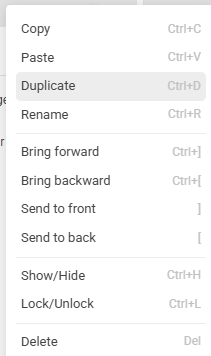
We lost the lock/unlock icon and the Settings icon (which is now right-click menu). The Copy/Paste functions seem to be the same as Duplicate? Am I missing something here?
If they bring back the icons for tablet (or even make it a UI option to show/hide the icons, that would be great.
2 Likes
Check the associated Keyboard Shortcuts . I don’t use them often but sometimes it is a real bonus .
2 Likes
That is true, but you still have to right click to select that layer. I will test it later today when I get some time to play.
UPDATE: I just tested it and you HAVE to use the right click on a layer to be able to use the keyboard shortcut. At that point what is the use of having a keyboard short cut?
4 Likes
Im not sure what the copy and paste are about. I’d prefer just a duplicate, one less step. Or maybe I’m missing something… lol
2 Likes
After reading this all, I tried to open creator on tablet too.
My opinions:
one less row of icons per layer
-good for PC, I only seldom used the lock icon, settings icon is not needed if there is right click to open the menu.
-maybe not so good for tablet, long press for right click. For me same inconvenient as to hit one tiny icon next to other, was not my favorite on any platform and one more thing why I do not use tablet for anything but browsing.
Copy/Paste options in menu
-at this time I can not see it doing anything else as duplicate, which has its own button there. I was hoping to get the possibility to paste it below or above active layer, instead just next the original.
-still good that the duplicate is no longer next to delete option, which I often managed to hit instead. Now ctrl+D, boom its there…
Shortcuts/keyboard input
-if were there before, I was not aware of these. What is here not to like, its great to just hit del instead going into a menu (at least on PC, I have no idea how to conveniently use these on tablet)
What could be better, I would rather have ctrl+arrows than +brackets for shifting layers order (rectangular brackets are not on my localized keyboard layout).
5 Likes
I have the same problem with not being able to see the bottom of the drop down menu when selecting one of the lower levels - cuts off ‘Delete’ which is a pain. This together with the problems mentioned in this thread clearly indicates that this update is clearly premature. I have noticed however, that it is not necessary to right click the icon you can just right click on any part of the layer description.
4 Likes
I didn’t see anything wrong with the way it was. It was way more functional the other way. Maybe if they get too many complaints, they will put it back? But I doubt they will
3 Likes
@Facer_Official - additional issues encountered on tablet
-
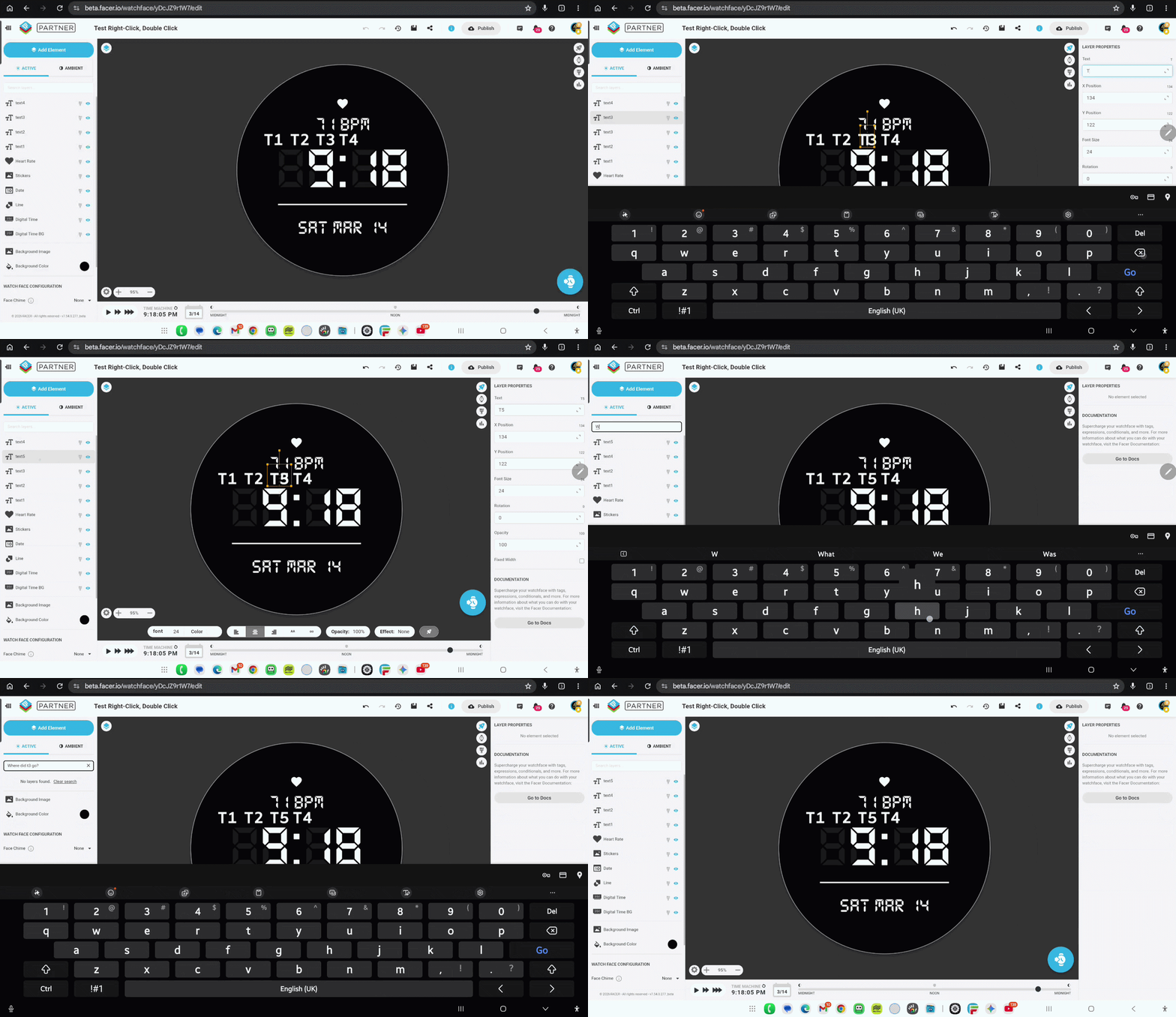
Long press on layer displays Right click menu, but if you then decide you don’t want to select a right-click menu choice, you can only dismiss the menu by selecting the search layer text box. (If there was a ‘X’ on the Right click menu, this would make dismissing the menu easier when opened in error.
-
When attempting to move a layer by long press the element, the Right click menu appears which obstructs the view and makes moving the layer more tedious.
-
Intermittently, when long pressing a layer which opens the right-click menu, sometimes other layers are disappear with no apparent reason. You have to reload the page to make the layer reappear.
This also happens when duplicating layers and renaming and moving ayer to.
-
If you open the Right-click menu at the bottom of the page, and it causees the menu to be partially hidden, it is not possible to scroll down and make visible the hidden options on the menu.

These issues did not exist prior to the recent change (to best of my knowledge)
Inspect test face : JC73UK - Test Right-Click, Double Click - watch face for Apple Watch, WearOS, Galaxy Watch, Pixel Watch, Huawei Watch, and more - Facer
1 Like
Ha Ha . Sorry . I tried and even the shortcuts did not work .
2 Likes
Nice explanation of the inconvenience of this “update”. A difference on my iPad; I never see the right click menu when I do a long press, because then I only get the move layer function.
1 Like
I suspect we just beta tested this update.
We found it a hassle but what do you think the users who are not in the community are going through now!
2 Likes
It might work fine on desktop browser. My tests are on mobile browser for android tablet, and @jivestaroso is iPad for iOS.
Facer support are aware and im hopeful a fix will be provided soon. Thanks to everyone for sharing their experiences with the updates.
4 Likes
@Facer_Official , would be really good if updates first deploy to beta.facer to allow user community testing before releasing to primary domain.
3 Likes
Yes . I normally use BETA but see that Beta and Normal behave the same with the right click Drop down Menu .
3 Likes
Just to be a little provocative - as a right click man I would put hide/unhide on the dropdown menu too and give us a bit more space for layer names
1 Like
Oops - its already there! In that case remove both icons 
1 Like
Not recommended. The icon toggle action is the perfect interface. This is how it is in Watch face studio also. Making simple actions into more than 1 step is a very bad idea. Somethings should be left alone.
2 Likes
Right clicking and drop down menus are fairly standard in most user interfaces these days so i dont entirely agree with you. HOWEVER, I think that eye icon is definitely better and easier where it is now and if only they would make it a bit bigger! Same with hide/unhide padlock. I use a pc i have no experience with tablets and I pads so can’t comment. To be honest I dont like change and im a firm follower of - if it aint broke don’t fix it!
4 Likes
Creating a duplicate of a layer is now at the bottom. Before it was on top, which makes more sense.
2 Likes
#184897