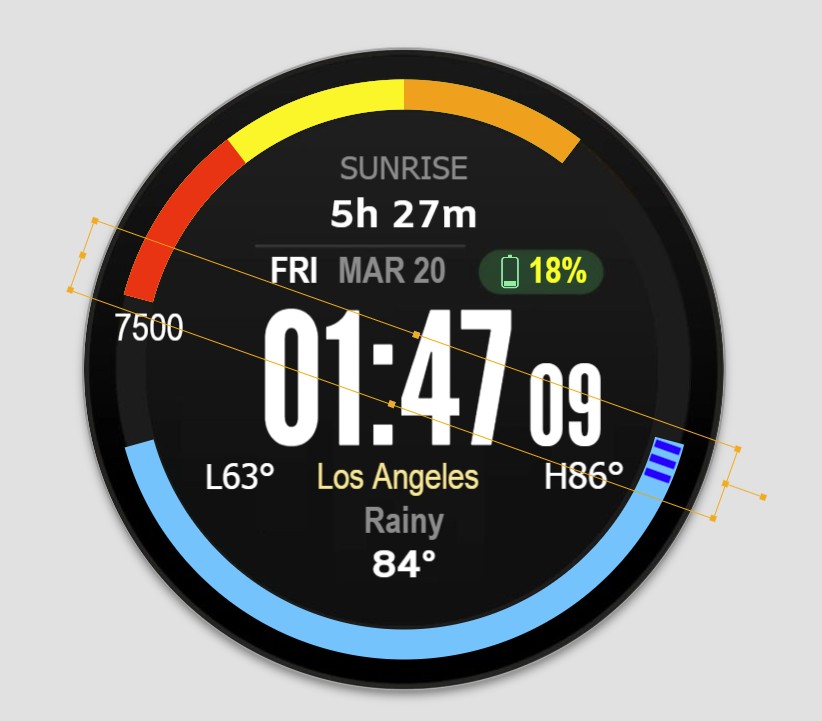
I have an arc (blue) at the bottom of the face that represents the hours of daylight and one that will represent the hours of darkness. I want to have a dial that will move along these arcs representing the time. Like a countdown until sunset or sunrise. Any help is greatly appreciated.
2 Likes
Nice idea and the makings of a decent looking Face there, well done  What you’re aiming at achieving seems fairly easily doable, and I’m sure our regular experts here will soon offer up different, as well as interesting ideas. My Math is rubbish so I can’t help sorry, my only thoughts would be having the Single Arc duplicated, with an Opacity Formula set to display each one at the correct Sunset/Sunrise Times, kinda like the AM/PM Indicators some people use (I used to use similar for different Day Time and Night Time Weather Icons)
3 Likes
If you are planning on making the face for WFF (WearOS6), the Sunrise and Sunset times are not available (default values are used - and users will complain that the watch is defective!).
If you are releasing the watch just for legacy Facer (non WFF, pre Wear OS 6 watches) then you will be fine.
5 Likes
Sorry, I would need more detailed description what are you actually trying to do.
So far I can only suggest to take a look for example into my inspectable face below. It has a progress bar in central area that is showing the part day when sun is up (sunrise and sunset correspond with its edges against the 24h dial) and the 24 hour hand actually follows the sun motion on the sky for the northern hemisphere.
However, like Jason mentioned above, this does not work on watches with wearOS6 (due WFF limitations)
4 Likes
In the photo, the blue arc represents the hours of daylight. I’d like for the three line dial to move it’s way around the arc as time passes toward sunset. When sunset occurs, the arc will be replaced by a gray arc to represent dark hours and the hand will reset to count toward sunrise. I’m not designing this for WearOS6. It was at the request of a friend. Thank you all in advance for the help!
1 Like
You could do us a favour and post the Three Bar Hand Resource . I would make the arc symmetric . I will happily try make a test but don’t want to start making resources . In the meantime I could use just a hand .
@gmthesarge Do you want your " HAND " to move from the right SR to Left SS ( cw ) then back from there to the right SR ( ac ) .
There was a good topic about this long ago so I just borrowed from there to not invent the wheel again.
In your case the expression for the hand should look something like this:
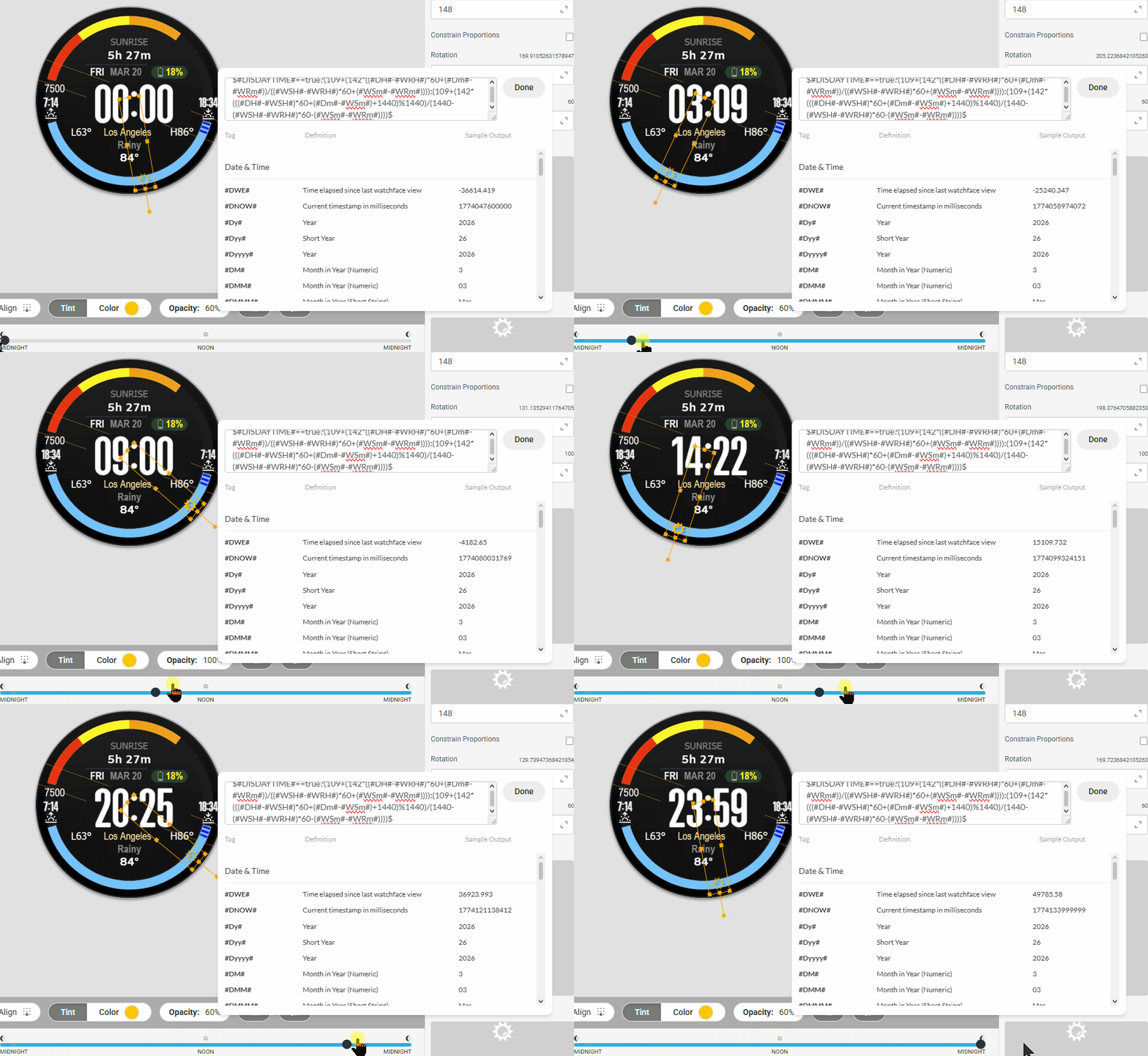
There 109 is the starting angle and 142 is the angular distance the image rotates around your blue arc
1 Like
Wow. Peter is the master. I knew there would be an expression Jedi on here. That’s exactly what I was looking for. You are correct, Peter. There will also be the problem of the length of the blue arc as the year progresses.
No, that wont be problem, the hand moves same arc as a ratio of current time to day or night length.
Unless you wanted to make the arc length variable.
1 Like
I see. Great work, @petruuccios1. Could you please post that expression?
I’m Harv btw. I’d been trying to figure it out from this older face that I made but couldn’t get it. Thank you everyone for the help.
Was it that hard to read from the image?
$#DISDAYTIME#==true?(109+(142*((#DH#-#WRH#)*60+(#Dm#-#WRm#))/((#WSH#-#WRH#)*60+(#WSm#-#WRm#)))):(109+(142*(((#DH#-#WSH#)*60+(#Dm#-#WSm#)+1440)%1440)/(1440-(#WSH#-#WRH#)*60-(#WSm#-#WRm#))))$
I just hope it wont be a part of another Garmin model clone like the one above.
1 Like
@petruuccios1 Wasn’t sure if I was seeing the entire expression. It’s for the face above not the Garmin clone. A request from a friend. The Garmin clone I made for myself. All of my faces are free. Facer is just something I do when I’m bored. I don’t use the pro version of creator so I have limitations. Thanks again for the help. I do appreciate it.
@RusselIcressor, I was trying to build it from a second hand. I tried using one of your expressions but wasn’t getting it right. I normally avoid the really complicated expressions. I copy expressions to an archive so I’ll have them for future builds but didn’t have anything on this or know if it was possible.
1 Like
I was looking at it but it would have taken a while . Peter is a wonder with these things . Great solution .
1 Like
Agreed. Peter is the man. Very impressive.
1 Like